

Snapshots
A snapshot saves the state of a VM's disks, and optionally its memory, so you can return to that moment later: for example before an upgrade or a risky change. Reverting discards everything written since the snapshot.
Snapshots are not backups: they live on the same storage as the VM and are lost with it.
Take a snapshot
- Open the VM's Snapshots tab and click Create Snapshot (or, from the VM menu, Snapshots → Take Snapshot).
- Enter a Snapshot Name, for example
before-update. Names can be up to 255 characters, cannot start or end with a space or start with a dot, cannot contain/,\or control characters, and must be unique for the VM. - Optionally add a Description.
- For a running VM, choose:
- Include memory state (hot snapshot): also saves the VM's memory, so after a revert the guest continues exactly where it was, programs still running. VMs with the Quantix Performance CPU mode cannot take memory snapshots; take a disk-only snapshot instead.
- Quiesce filesystem: asks the guest to flush and freeze its file systems during the snapshot, for a consistent disk state. Needs a guest agent (the Quantix Agent or
qemu-guest-agent) running in the VM.
- Click Create Snapshot.
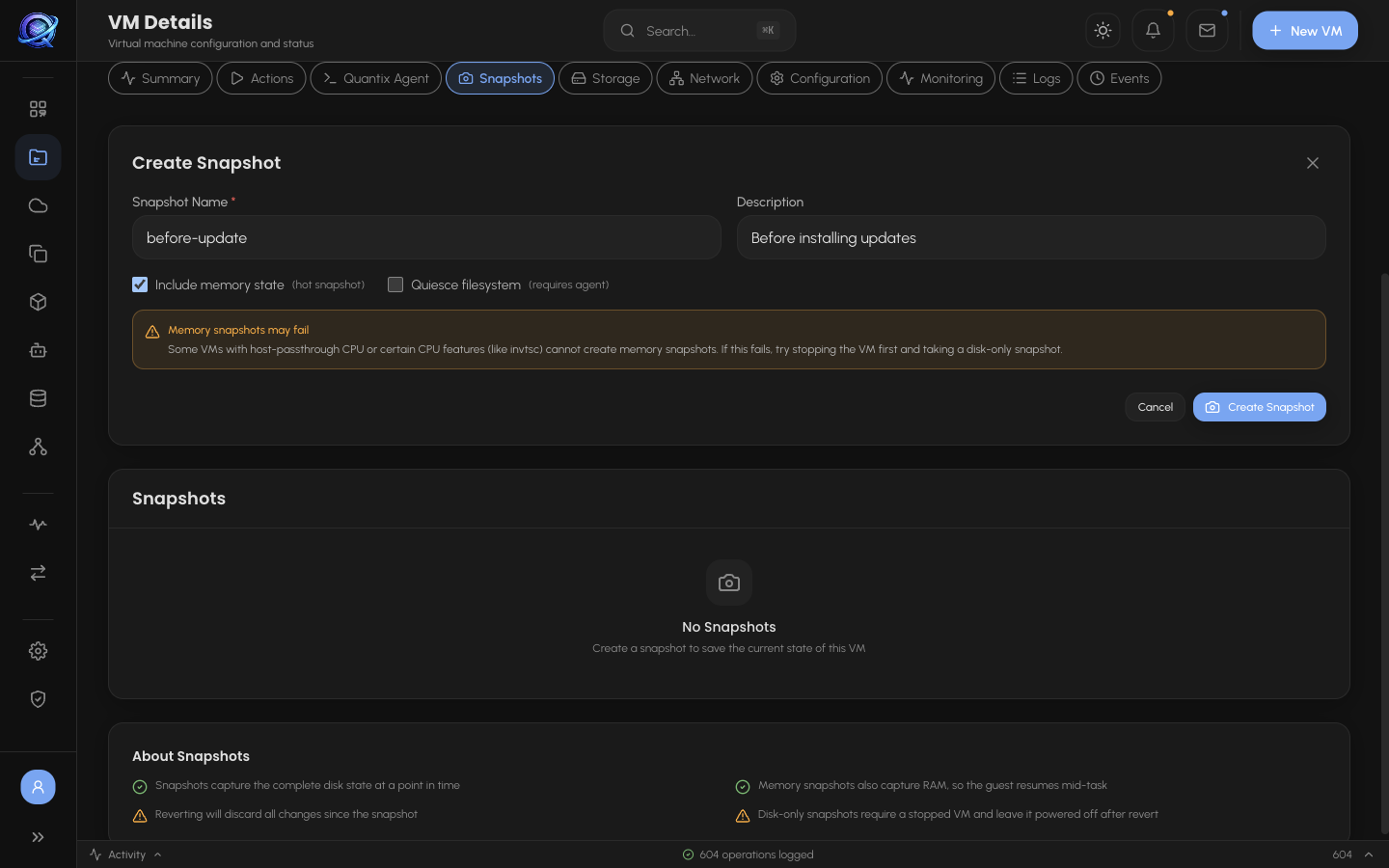
Expected result: Snapshot "name" created successfully, and the snapshot appears in the list (or in the tree, in Tree View).
Read the snapshot tree
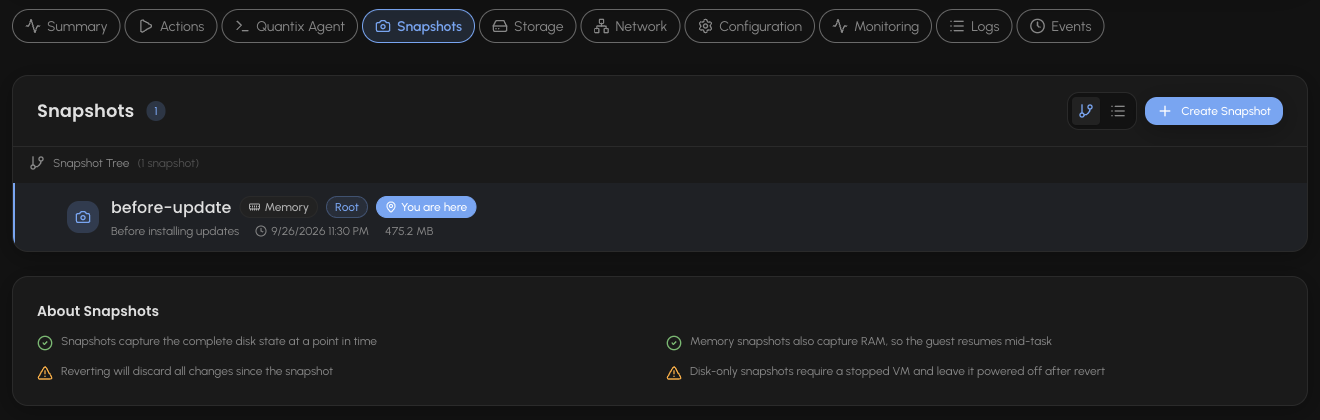
List View (default) shows them flat; Tree View shows how snapshots build on each other. The view you pick is remembered for you in this browser. Each snapshot shows its date, size and number of child snapshots, with badges:
- You are here: the snapshot the VM currently runs from;
- Memory: it includes memory state;
- Quiesced: the file systems were frozen when it was taken;
- Root: the first snapshot in the tree.
In Tree View, the Revert and delete buttons appear when you hover over a snapshot.
Revert to a snapshot
- On the snapshot, click Revert.
- Confirm Revert to this snapshot? with Revert.
- A memory snapshot brings the VM back running, in the captured state.
- A disk-only snapshot is reverted with the VM stopped, and the VM stays powered off afterwards. Stop the VM first; until then Revert is disabled and Stop VM to revert is shown beside it.
Expected result: VM reverted to snapshot successfully.
The VM's network adapters go back to the ones it had when you took the snapshot, with their original networks, IDs and MAC addresses. An adapter you added after the snapshot is removed; one you removed comes back. Security groups on an adapter the VM kept throughout stay as they are now, so a revert never loosens a group you tightened later.
When Quantix cannot prove the snapshot's adapters (a snapshot taken on the host itself or before 2026-07, a network or security group deleted since, or a MAC address another VM now uses), the revert still completes but the VM's adapter list stays as it was. The VM's status and events say why and name the addresses that differ, and the Network tab shows them so you can record or remove each one (see Network adapters).
One case shows no card: an adapter you moved to another network after the snapshot. The revert puts it back on its old network on the host while the VM still lists the new one, and the status says so. To reconnect it to the network the VM lists, use Change network on its card to move it to any other network and then back.
For a VM whose disks are on shared storage (for example NFS), the revert runs only on the host Quantix records as the VM's owner, so two hosts can never write the same disks. A VM that has stayed on its host reverts normally; see Troubleshooting below when Quantix refuses. A snapshot the host cannot revert is marked Revert blocked.
Delete a snapshot
- Click the trash icon on the snapshot.
- Confirm with Delete.
Deleting a snapshot removes the restore point only: the data the VM wrote since is kept. A snapshot that has child snapshots cannot be deleted; delete its children first.
Deleting a snapshot needs the Delete virtual machines permission; taking and reverting one need Change virtual machines. Without it the trash icon is not shown, and an API key or the assistant cannot delete snapshots either.
Snapshots and other operations
- A disk that has snapshots cannot be resized: delete the VM's snapshots first (see Disks and CD-ROMs).
Host reboots and updates
Quantix-OS keeps the host's snapshot metadata on its persistent data partition. The complete snapshot tree, including parent relationships and saved-memory file references, is restored before the virtualization service starts. It survives ordinary host reboots and OS updates that switch the A/B system slot. The disks and saved memory must also remain available on their original storage.
Install the complete host OS update to receive the persistence correction. Updating only the node daemon is insufficient. After the update, periodic persistence and orderly node shutdown capture existing metadata without interrupting running VMs. Avoid interrupting power before the first capture. For a host upgrading from an older installation image, ask support to preserve its snapshot XML and verify the supported update path before rebooting.
Snapshots whose metadata was already lost
Older Quantix-OS versions kept snapshot metadata in temporary storage. A host reboot could erase it even though QvDC still had the snapshot record and the VM's disks still contained the snapshot layers. Installing the correction cannot reconstruct metadata already lost in such a reboot.
These records remain visible as Revert blocked, with an explanation that host snapshot metadata is missing. They cannot be reverted without the original snapshot XML. If a valid migration recovery file is still available, an operation first attempts to restore its metadata and confirms that the host registered the snapshot before proceeding. Migration recovery files are temporary and are not a snapshot backup.
Delete on a record whose metadata is absent removes only that QvDC record. It leaves every disk layer and saved-memory file in place. It does not merge disks or reclaim space. A host or inventory read failure refuses the operation so a temporary outage cannot be mistaken for lost metadata. An older node or an unreadable migration recovery file also blocks record deletion until the node is updated or support resolves the recovery metadata. If the host could not restore its saved snapshot metadata during startup, it retains the saved copy and blocks record deletion until support resolves the restoration failure. Registered snapshots remain usable even when an unrelated recovery file is damaged.
For manual recovery, contact support with the VM and snapshot names. Preserve the current disk chain and any original snapshot XML or VM migration .qsnap file before changing anything. Support must verify the VM UUID, parent tree, current snapshot, disk paths and saved-memory references, then redefine the original XML in parent-first order with virsh snapshot-create --redefine. QvDC's names and timestamps alone are insufficient to recreate a safe snapshot. If no original XML survives, restore from an independent backup or arrange a verified disk-chain consolidation to retain the current VM data. Never delete an orphaned overlay by filename: it may contain all writes since the snapshot.
Troubleshooting
| Message | What to do |
|---|---|
| This VM already has a snapshot with that name | Choose another name. |
| Memory snapshots may fail | Shown for a running VM with Include memory state ticked. If the snapshot fails, stop the VM and take a disk-only snapshot. |
| Filesystem quiesce failed | The guest could not freeze its file systems. Check that the Quantix Agent is running, or take the snapshot without Quiesce filesystem. |
| Disk is currently busy | Another disk operation is running. Wait for it to finish. |
| The host no longer has this snapshot's metadata | A reboot on an older host may have lost it. Revert is blocked; follow the orphan recovery guidance above. Deleting this record retains disk and memory files. |
| Failed to revert to snapshot with a different host than ... is recorded as the one allowed to write this VM's disks | The VM's disks are on shared storage and another host owns them. The VM is unchanged. Migrate the VM back to its owner host, or ask an administrator to repair its ownership, then revert again. |
| Failed to revert to snapshot with ... restarted since Quantix last confirmed it as this VM's owner | The host rebooted since its owner was last confirmed. Stop the VM if it is running, start it (the start confirms the owner), then revert. |
| Failed to revert to snapshot with no host is recorded yet as the one allowed to write this VM's shared disks | The VM's owner on shared storage has not been recorded. Stop the VM if it is running and start it again; the start records the owner. Then revert. |
| Failed to revert to snapshot with this VM's ownership names an earlier installation of ... | The host was reinstalled. Once you have confirmed the VM is not running anywhere else, an administrator must repair its ownership. |
| Failed to delete snapshot with was not deleted and nothing changed | The host refused before it changed anything, and the VM can still be started. The rest of the message says why: a missing or damaged disk (fix the storage first), a host that cannot reach Quantix (wait until it shows as connected), or another host recorded as the owner (start the VM from Quantix). If it keeps failing, start the VM and delete the snapshot while it runs. |
| Failed to delete snapshot with could not read the VM's state | The host could not tell whether the VM is running. Nothing changed. Try again. |