

Give hosts access to a pool
A VM can run only on hosts that can reach the pools its disks are in. You choose the hosts when you create a pool. Shared pools can be assigned to more hosts later. A local pool belongs to the host whose disk holds it and cannot be moved to another host by changing its assignment.
| Pool type | Hosts |
|---|---|
| NFS | Any number. Every assigned host mounts the export. |
| iSCSI | Exactly one active host. |
| Local Directory or Local LVM | The one host that owns the directory or volume group. Register or create the pool on that host. |
Assign a host to a pool
Prerequisites: the host is added to QvDC and Ready, and it can reach the storage over the network. For a local pool, use the host that owns its directory or volume group. Quantix offers Assign only when the host's current report confirms the configured location.
Go to Storage → Storage Pools and open the pool.
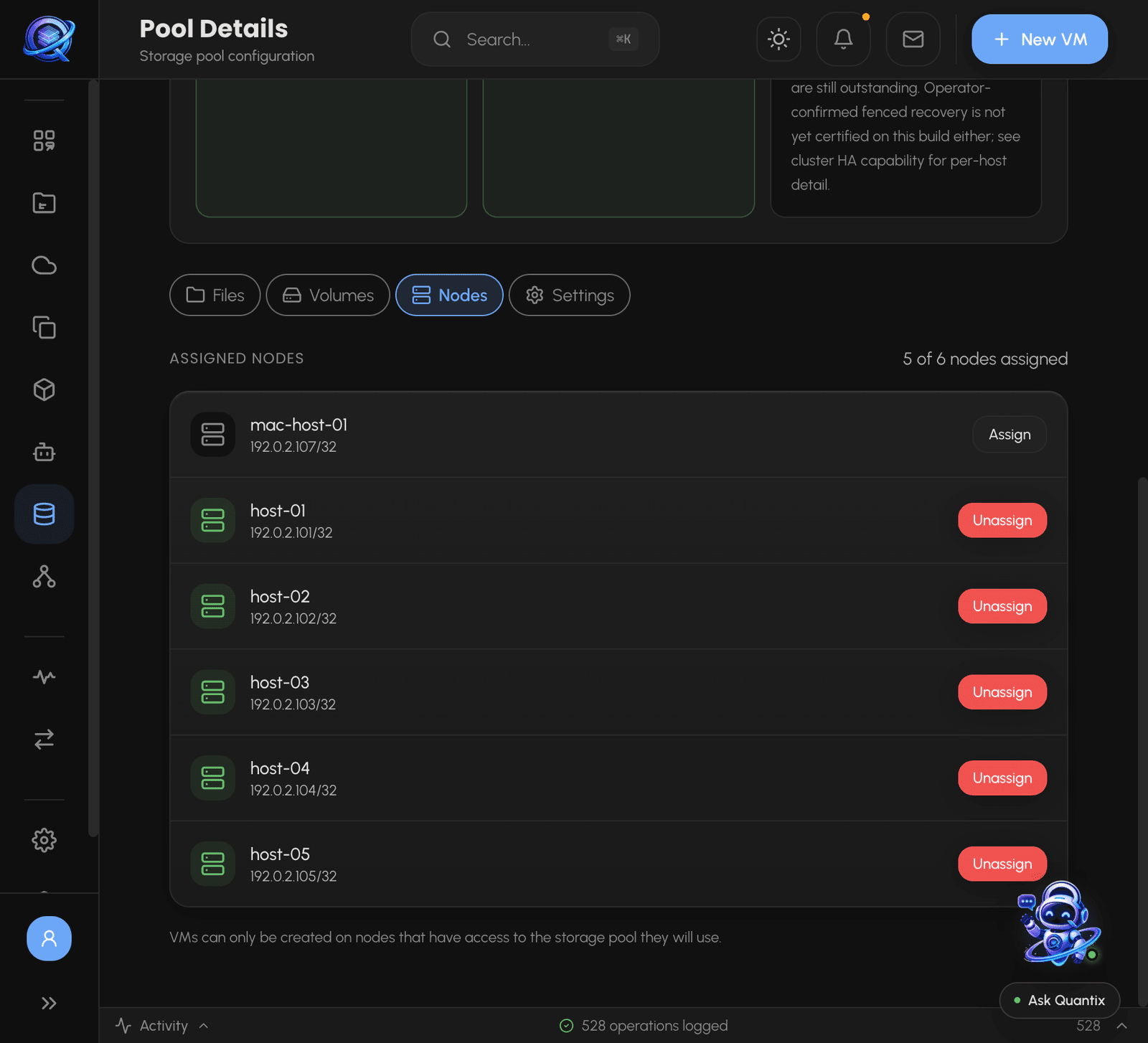
Open the Nodes tab. The header shows how many hosts are assigned, for example "2 of 3 nodes assigned". An NFS or Ceph pool created without a host list reads "Available on every host" instead; every host already has it, so there is nothing to assign.
Click Assign next to the host. The change applies immediately, without a confirmation.
The host mounts the pool within a few minutes. Until it has reported the pool, it shows Deploying under Node Status on the Settings tab.
You can also assign pools from a host: open the host, go to its Storage tab, and click Assign next to a pool under Available Storage Pools.
Unassign a host
Unassigning removes the host's access to the pool. It does not delete the pool or the disks in it, but VMs on that host can no longer start from or use disks stored there.
Migrate the VMs that are placed on that host and have disks on the pool to another host that has the pool, or delete them. Stopping them is not enough: Quantix counts every VM placed on the host, running or stopped.
On the pool's Nodes tab, click Unassign next to the host. The change applies immediately.
From the host's Storage tab, Unassign opens a confirmation that lists the VMs that depend on the pool; its Unassign button (followed by the pool name) stays disabled while any are listed.
Quantix refuses to unassign a pool from a host while VMs placed on that host have disks on it. The error lists the VMs: cannot unassign pool "…" from node "…"; dependent VMs: …
Quantix also refuses to unassign the last host of an NFS or Ceph pool. A shared pool with no hosts listed is on every host, so removing the last one would give the pool to every host instead of taking it away. Assign another host first, then unassign this one. Deleting the pool is not a way out: Quantix refuses to delete a pool that was ever mounted.
Check that every host can reach a pool
Do this after you create a pool, after you assign a host, and whenever a pool is not Ready.
On Storage → Storage Pools, click Refresh. The pages do not refresh by themselves.
Check the pool's badge. Ready means at least one host has the pool and no assigned host reports a failure — hosts that are still deploying do not count either way. Degraded means at least one host cannot reach it.
Open the pool and note, on the Nodes tab, how many hosts are assigned.
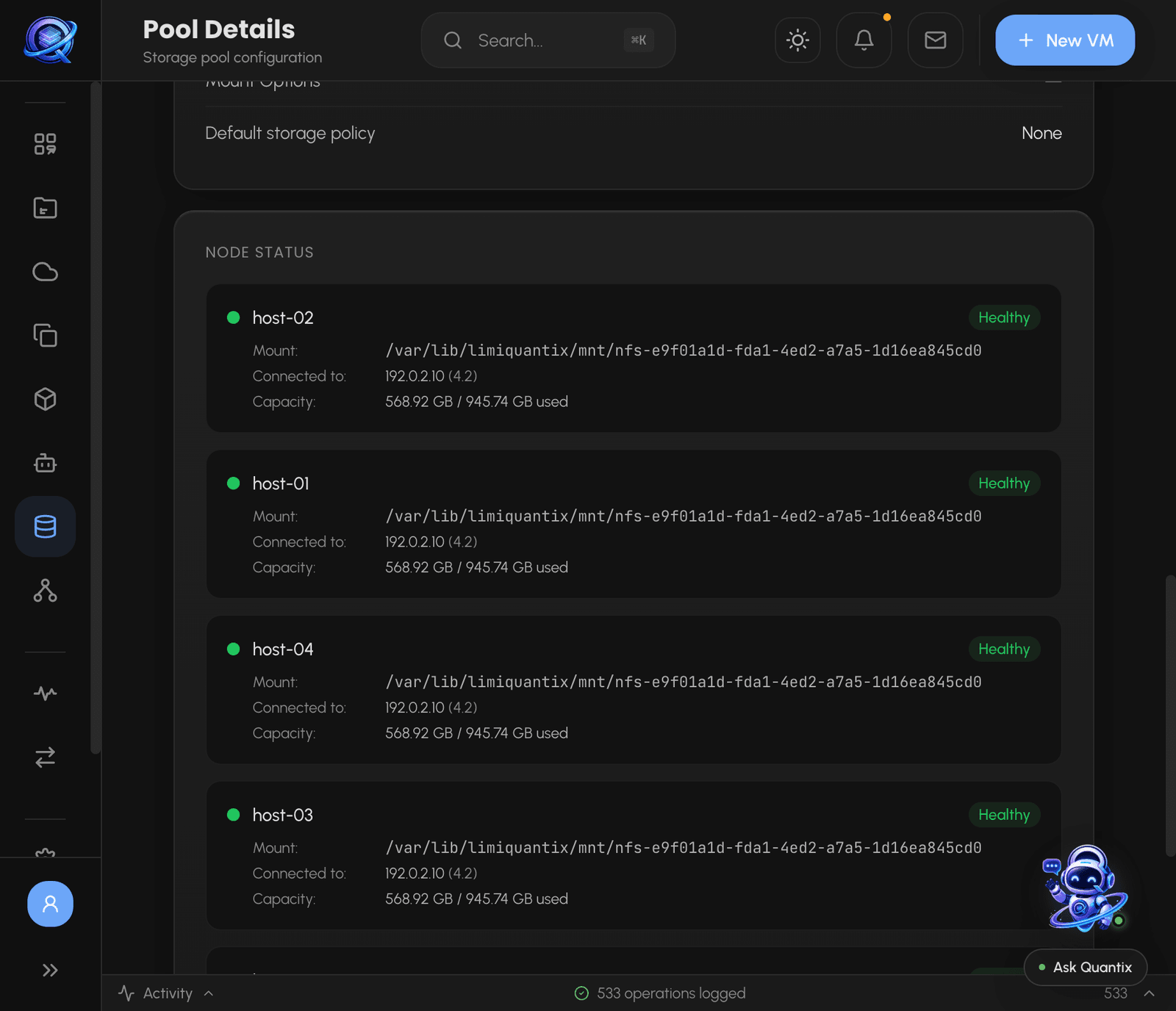
Open the Settings tab. Under Node Status there is one card per assigned host. Each card should show Healthy, with:
- Mount: — where the host mounted the pool;
- Connected to: — for NFS, the server address and the NFS version the host negotiated;
- Capacity: — used and total space as that host sees it.
For a shared pool, check the Datastore readiness panel above the tabs: Shared datastore and Live migration should both show Ready. Live migration also needs at least two healthy hosts on the pool.
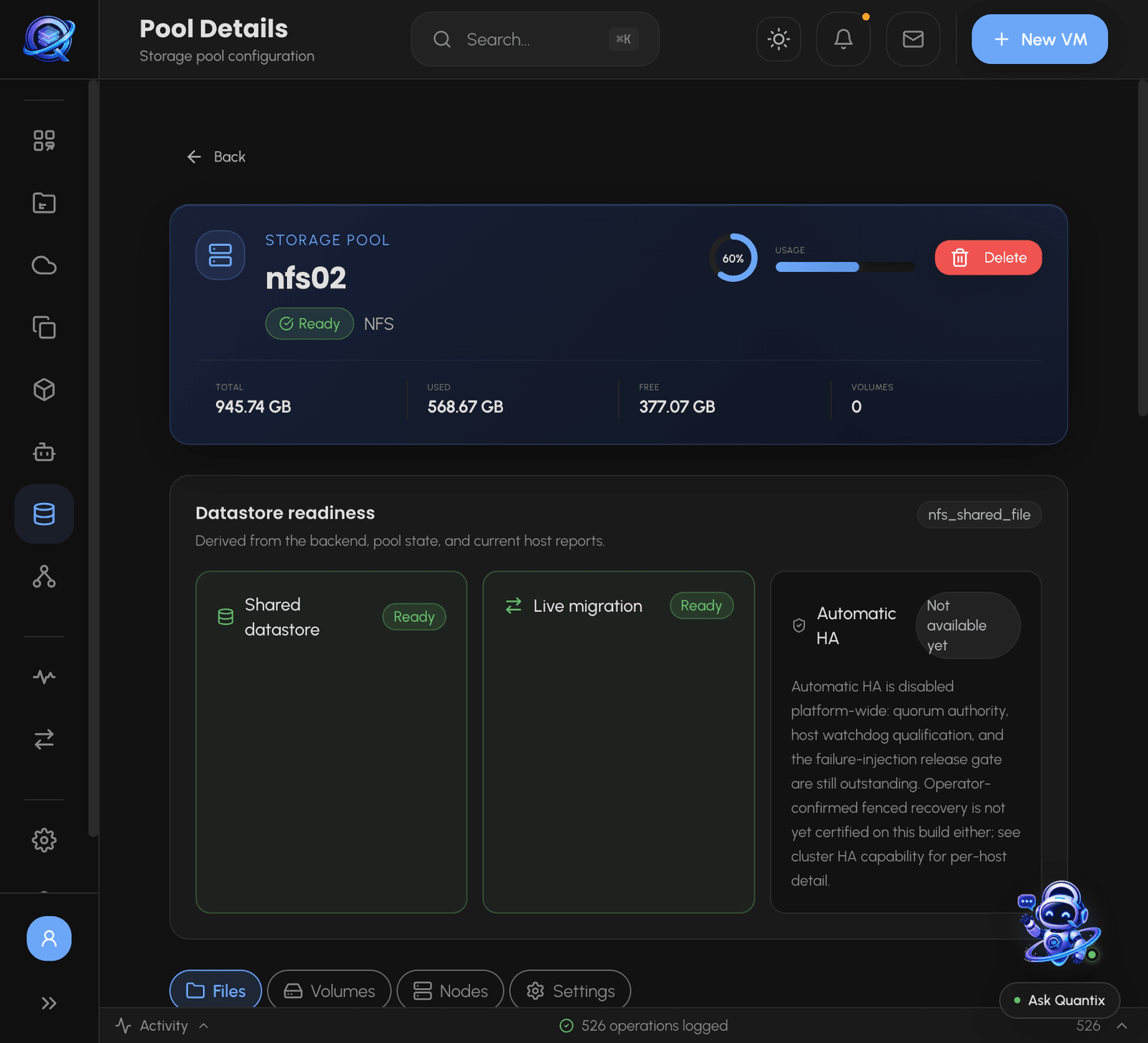
Every host can reach the pool when the number of Healthy cards equals the number of assigned hosts and the pool badge is Ready.
Host states under Node Status
| State | Meaning |
|---|---|
| Healthy | The host has the pool mounted and reports it. |
| Deploying | The host was assigned recently and has not reported the pool yet. |
| Unmounted | The host has not reported the pool for more than five minutes after it was assigned, or it stopped reporting it: "Pool not reported by node - may need to be remounted". |
| Degraded | The host reaches the pool, but it reports no free space: the pool is full. |
| Error | The storage did not answer the host, or reports no capacity. The card shows the Error: text when there is one. |
| Unknown | Quantix has no usable state from this host. |
A card shows the state the host last reported. If a host stops reporting altogether — for example, it is powered off — its card can still read Healthy, but after about 90 seconds the pool turns Degraded (or Error, if no host is left) and the pool's error message identifies the silent host. Read the pool's badge together with the cards.
Troubleshooting
| What you see | What to do |
|---|---|
| A host stays Deploying, then turns Unmounted | The host cannot mount the pool. Check its network path to the storage (and, for NFS, that the export allows the host). Quantix keeps retrying on that host. |
| The pool is Error and no host can reach it | Fix the storage or network problem, then click Reconnect on the pool. |
| Local storage — already on a host, and no Assign button | A local pool belongs to one host and cannot be moved by changing its assignment. |
| An unassigned local pool has no Assign button | Check its host report under Settings → Node Status. The reported location must match the configured directory before it can be assigned. Otherwise, register or create the pool on the host that owns it. |
| A local pool cannot be assigned to this host | Register or create the pool on the host where its directory actually is. |
cannot activate iSCSI on a second host | Unassign the iSCSI pool from its current host first. |
| Live migration is Not ready with "At least two healthy hosts must report this pool." | Assign a second host, or fix the host that is not Healthy. |