

Create an iSCSI pool
An iSCSI pool uses a LUN on your SAN as block storage for one host. Only one host has the pool active at a time, so VMs on it cannot be live-migrated. To move the pool to another host, you unassign it from the current host and assign it to the new one.
If you need storage that several hosts use at once, use an NFS pool instead.
Prerequisites
The target's portal address (for example
203.0.113.50:3260) and target IQN. The host must find the target when it runs discovery on that portal.The target allows the host that will use the pool to log in without CHAP authentication.
Two network paths from the host to the target, for multipath. For a lab or an evaluation you can allow a single path instead (see step 4).
A LUN that already holds a filesystem. Quantix adopts an existing filesystem and never formats the LUN. Before you create the pool, prepare the LUN from any Linux machine that can see it:
- make the whole LUN an LVM physical volume, create a volume group on it, and create a logical volume named
data; - format
datawith XFS or ext4.
A blank LUN is refused.
- make the whole LUN an LVM physical volume, create a volume group on it, and create a logical volume named
The host is added to QvDC and shows Ready.
A user with the admin or operator base role, or the System administrator role.
Create the pool
Go to Storage → Storage Pools and click Create Pool.
Choose iSCSI ("Block storage over network (enterprise SAN)") and click Continue.
Under General Settings, enter a Pool Name and, optionally, a Description. Under iSCSI Configuration, enter the Portal Address and the Target IQN.
Leave Allow a single path (lab and evaluation only) cleared unless the host has only one network path to the target. With a single path, a link or controller failure becomes an I/O error inside the guests instead of a brief pause. Leave Enable CHAP Authentication cleared.
Leave Shared Storage off for an XFS or ext4 volume. Turn it on only when the
datavolume is formatted with OCFS2; the pool is still active on one host at a time.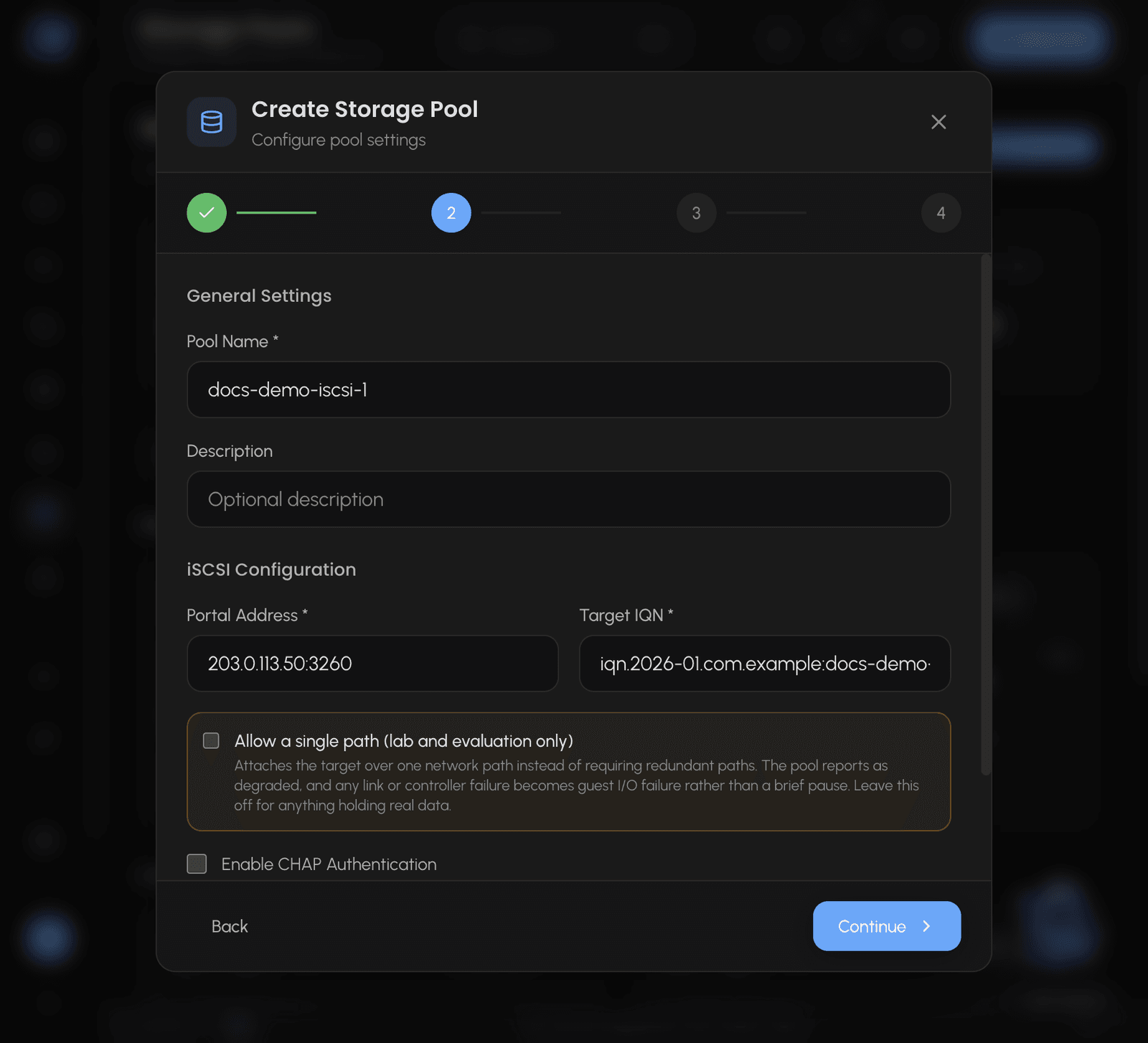
Click Continue. The banner reads Exclusive iSCSI Activation — "Select exactly one active host." Click the host that will use the pool.
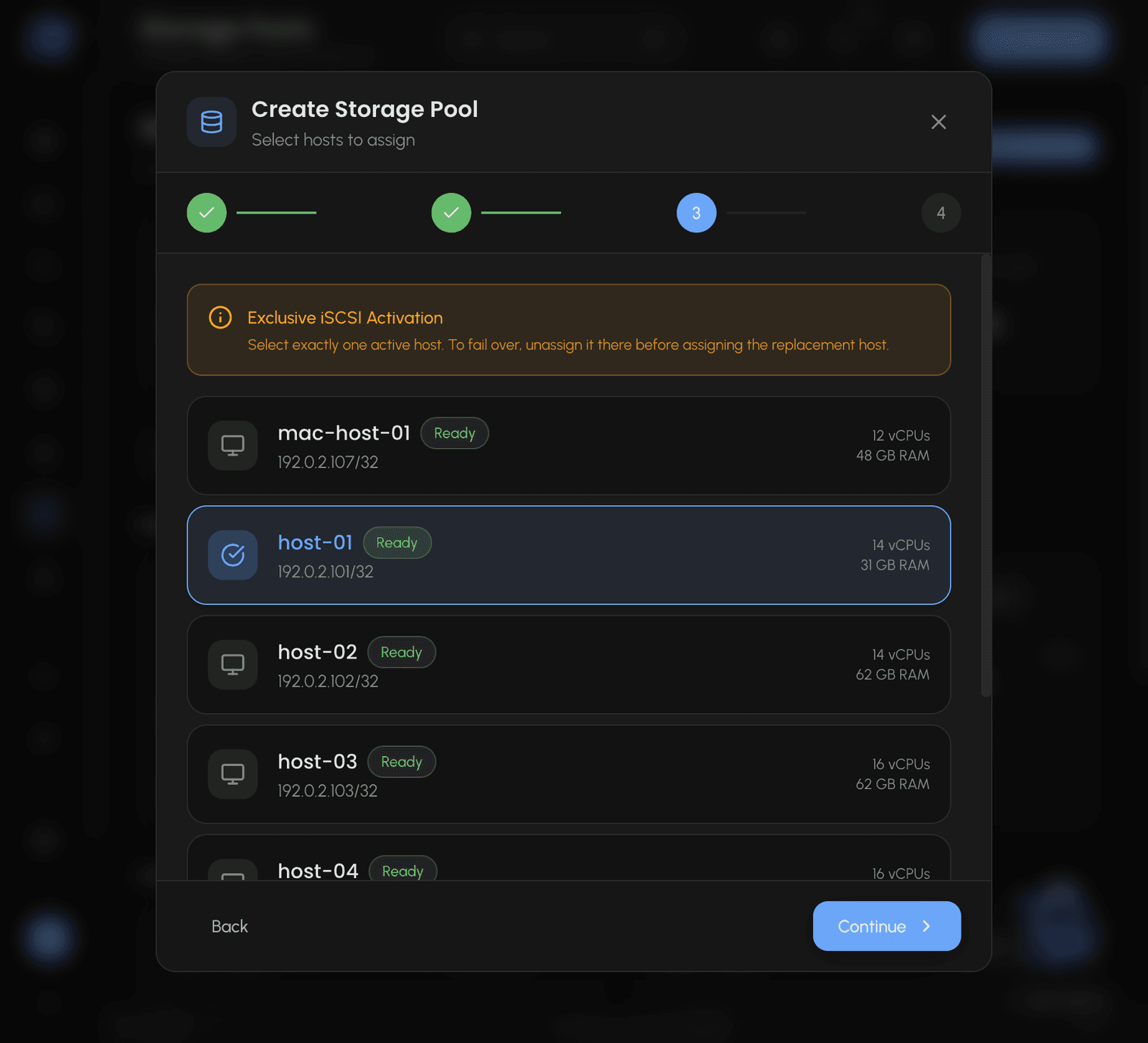
Click Continue, check the review step, and click Create Pool.
Expected result
The host logs in to the target, finds the data volume and mounts it. The pool appears under Local storage on the Storage Pools page, because only one host uses it. When you open it, the Datastore readiness panel shows Legacy single-active — "This pool requires manual failover and must not be active on two hosts."
Click Refresh until the badge shows Ready, then confirm the host's state on the Settings tab, as described in Check that every host can reach a pool.
Move the pool to another host
The pool can move only when no VM placed on the current host — running or stopped — has a disk on it. Quantix refuses the unassignment otherwise, and names the VMs.
- Open the pool, go to the Nodes tab and click Unassign next to the current host.
- Click Assign next to the new host.
Quantix refuses to activate an iSCSI pool on a second host while the first still has it.
Troubleshooting
| Message | What to do |
|---|---|
Target … not found on portal … | The portal does not list this IQN for the host. Check the IQN and the target's access settings. |
adopt requires a recognized LVM data LV | The LUN holds something other than an LVM physical volume. Prepare it as described in the prerequisites. |
iSCSI LUN is blank | The LUN has no filesystem. Prepare it as described in the prerequisites. |
has no 'data' logical volume | The volume group on the LUN has no logical volume named data. |
exclusive iSCSI requires existing ext4 or xfs | Format the data logical volume with XFS or ext4. |
No multipath map for iSCSI target | The host found only one path. Add a second path, or tick Allow a single path (lab and evaluation only). |
iSCSI requires exactly one active host | Select exactly one host on the host step. |