

External networks
An external network connects VMs directly to the physical network the hosts' uplink NICs are cabled to, without a VLAN tag. The VMs appear on that network like any physical machine: they use its subnet, its gateway and, usually, its DHCP server.
Use an external network for the LAN your hosts already sit on, or for a dedicated physical network cabled to a spare NIC on every host.
Before you start
- Each host that will run VMs on the network has an uplink bridge with a physical NIC attached (see Host networking).
- You know the physical network's subnet and gateway, and whether a DHCP server already serves it.
Create an external network
Go to Networking → Virtual Networks and click New network.
Choose External Network and click Next.
Enter a Network Name and, optionally, a Description. Click Next.
On Configuration:
- Fabric — leave the default,
provider. Each host sends the network out through the bridge it binds to this fabric. For another fabric, map it on every host first; - Bridge override (advanced, optional) — leave blank so each host uses its own uplink bridge, whatever it is called on that host;
- Network CIDR and Gateway — the physical network's subnet and router address, for example
192.0.2.0/24and192.0.2.1; - MTU — leave blank for 1500;
- DHCP Server — leave it off. VMs on an external network are bridged straight onto your physical network, so they get their addresses from the DHCP server that already serves it, or from static configuration.
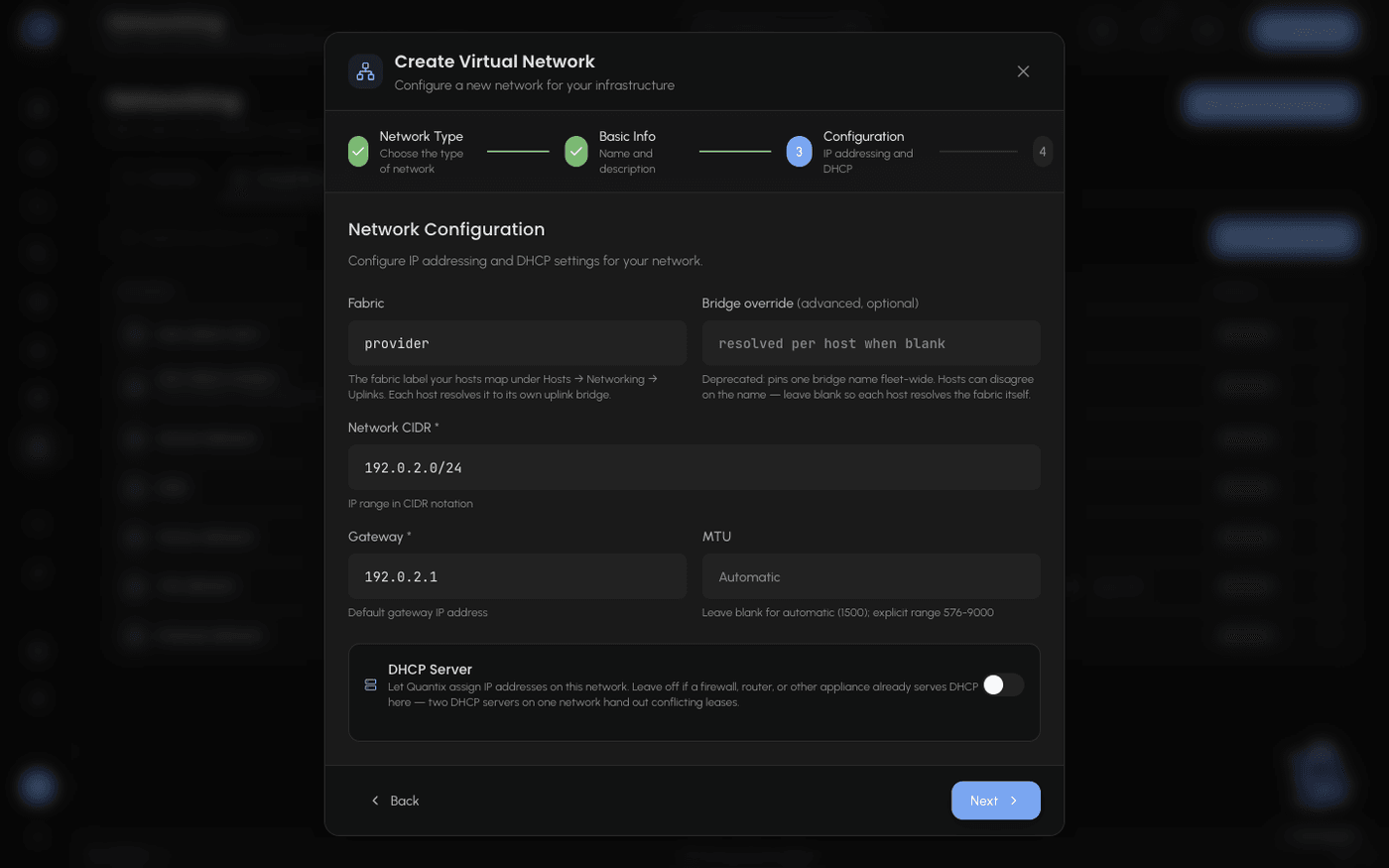
- Fabric — leave the default,
Click Next, check the summary, and click Create Network.
Expected result: the network is listed with type External and status READY.
Things to know
- VM adapters on an external network are bridged directly to the host's uplink. Security groups are not enforced on them, and addressing comes from your network, not from Quantix.
- If you run container runtimes on this network, set a Runtime address range on the network's Subnet & DHCP tab that lies outside your DHCP server's pool, and list any fixed addresses inside it under Reserved addresses.
Troubleshooting
| Symptom | What to do |
|---|---|
| A VM does not start, with a message that the network needs fabric '…' on host '…', which does not map it | Bind the fabric on that host under Hosts → the host → Network → Advanced → Fabric bindings (see Map a fabric to a bridge). If the host has no uplink bridge at all, set its uplink first. |
| VMs get no address | Check that your network's DHCP server is reachable on the segment the uplink NICs are cabled to, or configure static addresses in the guests. |
| VMs have an address but cannot reach the gateway | Check the host's uplink on Networking → Hosts: the NIC should be attached to its bridge and have link. |