

Create a template
A template is made from a VM you have prepared. Converting takes the VM's disks and settings into the template, and the VM itself is removed: if you still need the VM, clone it first and convert the clone.
Prerequisites
- Permission to change the VM.
- The VM is stopped. Paused or suspended VMs must be resumed and shut down first.
Prepare the VM
- Install the operating system, updates and the software every copy should have. Install the Quantix Agent so deployed VMs report their IP addresses and can be shut down cleanly.
- Remove anything that must be unique per machine: saved credentials, host keys you do not want shared, logs.
- For Windows, generalize the installation with
sysprep /generalizeso each deployed VM gets its own identity. - Shut the VM down from inside the guest.
Convert the VM
- From the VM's menu choose Convert to Template.
- In Convert to Template:
- Template Name (required): defaults to the VM name followed by the word Template. If you may want to turn the template back into a VM later, use a name without spaces (letters, numbers, hyphens and underscores);
- Description and Notes: optional;
- Folder: a template folder, or No folder. Shown when template folders exist.
- Click Convert to Template.
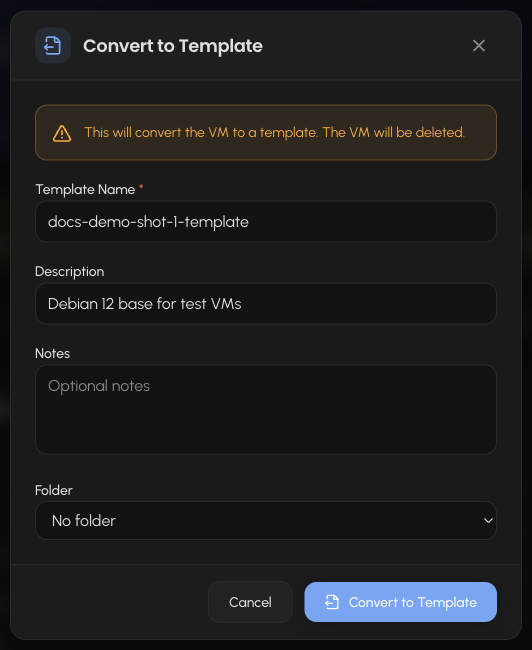
Expected result: VM converted to template "name". The VM leaves the VM list and the template appears on the Templates page.
Troubleshooting
- Convert to Template is greyed out: the VM is not stopped. Hover over the item to see its state, shut the VM down, and try again.
- A red error in the dialog: the conversion was refused; the message says why. The VM is unchanged.
- The VM has snapshots / runs on a snapshot layer: the VM's newest data is in its snapshot files, not in the disks a template takes. Delete the VM's snapshots (which merges them into the disks), then convert. If you need to keep the VM as it is, clone it first and convert the clone.
- Update the host: the VM's host runs a Quantix-OS version that cannot report which snapshot layer the disks run on. Install the Quantix-OS update on the host, then convert.