

Remote access relay
Quantix Relay carries VPN client traffic to a site's connector over an outbound connection, so the site needs no inbound firewall rule or port forward (see Networking, VPN access). Admin Panel → System → Remote access relay answers one question: can the client profiles you hand out today actually reach this site? The page only reads, and refreshes itself every 30 seconds. Click Refresh status to check again; Last checked shows when this page received the assessment.
Prerequisites
- An account with the admin base role.
Read the relay status
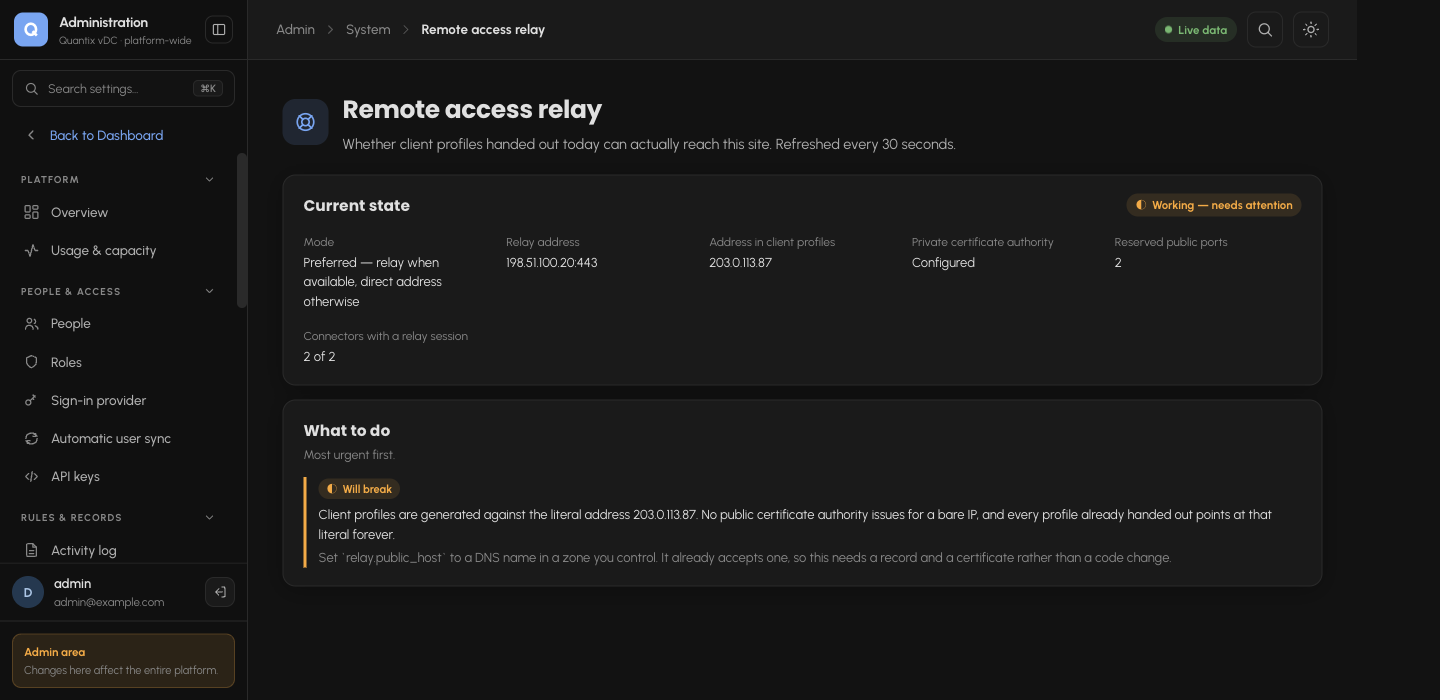
The Current state card shows an overall verdict:
| Verdict | Meaning |
|---|---|
| Carrying traffic | The relay is working. |
| Working — needs attention | Clients can connect now, but a finding marked Will break needs fixing. |
| Not carrying traffic | Client profiles that depend on the relay do not work right now. |
| Off | The relay is switched off; client profiles use the connector's own address. |
The verdict is an assessment of sessions and configuration, not a live test from a VPN client. An online connector or reserved public port alone does not prove that remote traffic passes. The page reports aggregate connector session counts rather than a per-connector inventory.
Below the verdict:
- Mode — Off (profiles use the connector's own address), Preferred (relay when available, direct address otherwise) or Required (profiles are refused unless the relay is carrying traffic).
- Relay address and Address in client profiles — where VPN clients are sent.
- Private certificate authority — whether one is configured.
- Reserved public ports and Connectors with a relay session (for example 2 of 2).
Act on the findings
What to do lists findings, most urgent first, with the original message and remedy under Next step. Expand Finding code to identify the finding when requesting help:
- Broken now — fix first; the relay is not carrying traffic for some or all clients.
- Will break — works today, but will fail, for example because client profiles point at a bare IP address instead of a DNS name.
- For information — nothing to fix, for example when the relay is off.
Nothing to act on. means there are no findings.
The relay's mode and addresses are part of the QvDC appliance configuration and cannot be changed on this page. To set up or change them, follow Point QvDC at the relay. If a finding asks for a change you cannot make, contact Quantix support through the customer portal.
Troubleshooting
"The appliance refused its relay configuration at startup" — a value in the appliance's relay settings is invalid, so the relay is off whatever Mode shows. The finding names the value; fix it and restart Control Plane (see Point QvDC at the relay).
"Could not read the relay status" — QvDC could not assess the relay just now. The page retries every 30 seconds; click Refresh status to try again at once. An unavailable assessment is never shown as healthy.